The easiest way to migrate your Odoo Community and all of your custom modules to a new Odoo version
Stuck in an old Odoo version? Upgrade your whole Odoo. Test it before you pay.
We move your database, filestore, and in-scope custom modules to the newer version you choose. You get one fixed price and a working upgrade on your own data to review before payment.
Typical projects: $5,000–$15,000. Three system details get you a quick estimate. Upload your database and addons to start the 24-hour fixed-price review.
13 19 Upgrades from Odoo 13–18 to a newer version through Odoo 19Recent upgrade results, with prices
$13,000 fixed
Odoo 13 Enterprise → 16 Community, including one addon doing 20–30 jobs
Under $16,000 fixed
Odoo 14 → 16, around 20 custom modules, delivered in under 1.5 weeks
Tested before payment
Both customers reviewed their own upgraded system before paying
Why upgrade an old Odoo version?
Older versions get harder to secure and maintain.
Your system will not stop on a set date. The costs and risks build as its support stack ages.
Security fixes stop
Odoo patches its three most recent versions. Fall off that list and newly found holes stay open — on the system that holds your customers, invoices, and prices.
Python and PostgreSQL reach end of life
Old Odoo depends on old versions of Python and PostgreSQL. Routine server updates become harder, and keeping the old stack alive costs more each year.
Community module fixes stop
The free community modules (OCA and others) are maintained for current versions. On an old branch, bugfixes and improvements simply stop arriving.
Each skipped release also adds work to the eventual migration. Check your version's support status, then price the upgrade while you still have time to plan it. Check your Odoo version → · Read the case for upgrading Community →
How it works
From a quick estimate to a tested upgrade.
01
Start with three system details
Send your current version, target version, and approximate custom-module count, plus a work email for the reply. We use them to send a quick estimate; no files are needed at this stage.
02
Upload your database and addons
When you want the committed price, send a database copy and your addons through the protected upload. We inspect the actual system, then send one fixed price, the timeline, deliverables, and acceptance checks within 24 hours of receiving both files. No upgrade work starts until you approve them.
03
We upgrade a copy of your system
We migrate the database, filestore, and included custom modules. Then your team logs into the new version, reviews the verification report, and tests the workflows that matter.
04
Pay, download, and go live
Payment happens only after the agreed checks pass. Then you receive the database, addons, report, and go-live instructions — with an optional scheduled final run so you go live on data that's hours old.
How payment works
You agree the acceptance checks before work starts.
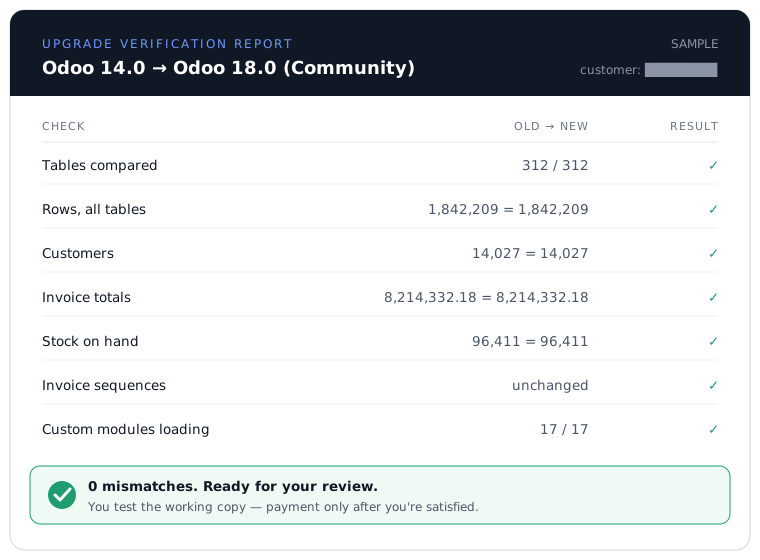
Your Order lists the exact acceptance checks: row counts, financial totals, stock on hand, document sequences, and the critical workflows your team names before approval. Before you pay, we hand you a report comparing your old instance to the new one:
You get a working preview and seven days to test it. If an in-scope check fails, we fix it. If we cannot make the agreed checks pass, you owe no service fee. Read the plain-English payment terms →
Detailed customer results
See the scope, delivery time, and price.
These two published projects show the version jump, custom-module load, delivery time, and paid price. Both customers reviewed a working upgrade before payment.
Odoo 13 Enterprise → 16 Community
One giant custom addon doing 20–30 different jobs, plus 10–15 more modules. Switched off Enterprise too — no more subscription fees. $13,000 fixed.
Read the case →Odoo 14 → 16, ~20 custom modules
Around twenty addons, some with genuinely complex interdependent logic. Done end to end in under 1.5 weeks, under $16,000.
Read the case →Did we upgrade your instance? A public review on Clutch or Google helps the next company stuck on an old version find us.
Choose your version jump
From Odoo 13–18 to a newer version.
The whole instance moves together: database, filestore, and custom modules. Choose your current and target versions for the likely risks, upgrade path, and price band:
Plain answers
What to know before you ask for a price
Price, scope, data handling, timing, and what happens to your live system.
In one sentence: what do you do?
You're running an old version of Odoo (say Odoo 14). We move your whole system — all your data and any custom features built for you — onto a newer version, hand you a working copy to try, and you only pay once you've seen it working.
We’re not Odoo migration experts. Is this still the right place?
Yes. You do not need to arrive with a migration plan. If you run self-hosted Odoo Community and want to move to a newer version, start with your current version, target version, and approximate custom-module count. We send a quick estimate first. A database copy and your addons are needed before we commit to the fixed price.
How much does it cost?
Most upgrades land between $5,000 and $15,000 USD. But that's a typical range, not a menu price — a small, tidy setup can be less, and a big system with lots of custom features or many versions to jump can be more.
Send your current version, target version, and approximate custom-module count for a quick estimate at no charge. For the exact fixed price, upload a database copy and your addons so we can price what is actually in the system. No meeting or paid discovery phase is required. See market rates and how our pricing works →
Why was the quote from our Odoo partner so much higher?
Large quotes often price the uncertainty around the work: workshops, meetings, retainers, discovery, then an open-ended hourly project. We sell one narrow outcome — a whole-instance Community upgrade — so we can quote the upgrade itself as fixed-scope work. Why quotes balloon →
Do we have to pay before we know it works?
No. We give you a login to a working copy of your own system on the new version. Your team reviews it, and payment is requested only after the agreed acceptance checks pass. You see the evidence before you pay.
How do we know our numbers didn't get scrambled?
Before you pay, we hand you a simple report that checks the new system against your old one — row counts, financial totals, stock on hand, invoice numbers. If anything is off, we fix it before it reaches you. See the guarantee →
What do we actually need to send you?
For the quick estimate, send your current version, target version, approximate custom-module count, and work email. For the committed fixed price, we need a copy of your database and your custom modules, uploaded through a protected page. A plain step-by-step →
Our system is heavily customized — is that a problem?
No. Heavy customization is common. One recent customer had a single addon doing 20–30 different jobs plus a dozen more modules; that upgrade was $13,000 fixed. Complexity affects the price, not whether you get a fixed one. Describe anything unusual in the quote form and we will give you an honest number.
Is our data safe?
Your files upload over a private, time-limited link into protected EU storage. We work on a copy, never ask for production access, and delete project copies on the published schedule. The Service Terms, DPA, and Privacy Notice state exactly what happens to the data. Read the data-handling policy →
What happens to our live system while you work?
Your live system keeps running the old version, untouched, because we work on a copy made from your backup. When you're ready to switch, you either re-enter the handful of orders created in the meantime, or book a scheduled final run: we re-run the proven migration on a fresh backup, so you go live on data that's hours old instead of weeks. How going live works →
Who looks after the system after we go live?
Whoever does now. Your existing Odoo partner, IT person, or hosting provider keeps running the system day to day, exactly as before — we hand over your upgraded database, your code, and plain go-live instructions written for them. We do the upgrade; nothing about your ongoing support changes.
Can't we just stay on our old version?
For a while, yes. Nothing stops working on a set date, and Odoo's 2026 "surcharge" doesn't apply to self-hosted Community. Security fixes do stop for old versions, the Python and PostgreSQL underneath reach their own end of life, and community modules stop getting bugfixes. The cost tends to show up later as an incident or a harder migration. The full picture →
How long does it take?
You get a quick estimate within 24 hours from the three system details. If you upload your database and addons, we inspect them and send the committed fixed price within 24 hours. The upgrade timeline comes with that fixed price, before you approve any work.
Is this for self-hosted Odoo Community?
Yes. If you run Odoo Community on your own server or through a hosting provider, you're in the right place. Odoo Enterprise and Odoo's online service have their own upgrade routes.
Start with a quick estimate.
Send your current version, target version, and approximate custom-module count. If you need a committed fixed price now, add your database copy and addons for us to inspect.
Get my quick estimate